
JoinerCAD v3.3.0 Update: Changes to Metadata Handling
With the release of JoinerCAD v3.3.0, we have introduced important changes to how JoinerCAD manages component metadata when used with Autodesk Fusion.
These changes are a direct response to Autodesk's rollout of the Collaborative Editing Hub, which introduces a new approach to storing and synchronizing component information. The update ensures that JoinerCAD continues to deliver the performance and workflow users expect while remaining compatible with Autodesk's evolving platform.
For most users, no action is required.
What has changed?
From JoinerCAD v3.3.0 onwards:
- Users not yet migrated to Autodesk's Collaborative Editing Hub will continue working exactly as before.
- Users who have been migrated will automatically use JoinerCAD's updated metadata handling.
- Component Name and Code (Part Number previously) values managed by JoinerCAD are now stored independently of Autodesk Fusion's standard metadata fields.
- Metadata is managed through the new BOM Management workflow and continues to be used by BOMapp, Smart Hardware, Replacement, Rename and Automatic Numbering commands.
- Users can still import Autodesk Fusion Properties into JoinerCAD whenever required.
These changes preserve application performance while ensuring compatibility with Autodesk's latest cloud infrastructure.
Background
Component metadata in Autodesk Fusion
Every component in Autodesk Fusion contains a metadata record that stores information such as:
- Component Part Number
- Component Description
- Display Name
- Additional properties provided by Autodesk Fusion or extensions such as Fusion Manage.
Historically, this metadata was managed locally while users worked on their designs.
How Fusion worked before
Previously, Autodesk Fusion hubs acted primarily as cloud storage for design files.
Component metadata remained associated with each component but was managed locally on the user's computer. It was synchronized with the cloud only when the design was saved.
This approach allowed JoinerCAD to efficiently read and update metadata across several features, including:
- Smart Hardware
- Automatic Rename & Numbering
- Replacement
- BOMapp
Autodesk's Collaborative Editing Hub
To support Fusion's Bill of Materials (BOM) functionality and improve collaborative design workflows, Autodesk introduced the Collaborative Editing Hub.
Unlike previous Fusion hubs, the Collaborative Editing Hub stores not only design files but also assembly structures, relationships between components and their metadata directly in the cloud instantly.
The new platform continuously validates component descriptions and part numbers to identify duplicates. If duplicate components are detected, Fusion warns users because identical descriptions and part numbers are treated as the same component, which can directly affect Bills of Materials.
As part of this change, component metadata is no longer managed locally—it is synchronized continuously with Autodesk's cloud services.
Migration to the Collaborative Editing Hub is performed gradually by Autodesk. Users are notified by email once their Fusion hub has been migrated. This migration process is fully managed by Autodesk and cannot be controlled by end users.
Impact on JoinerCAD
Prior to this update, JoinerCAD frequently read and wrote component metadata in several tools, including:
- Smart Hardware
- Automatic Rename & Numbering
- Replacement
- BOMapp
With Autodesk's new cloud-based metadata model, these operations became significantly slower because every metadata update required cloud synchronization.
Additionally, Autodesk Fusion may automatically generate unique component codes within migrated hubs. These part numbers could appear in BOM reports, even though they were never intentionally assigned by the user.
How JoinerCAD v3.3.0 addresses this
To maintain the performance users expect, JoinerCAD no longer relies on Autodesk Fusion's continuously synchronized metadata fields for Name and Part Number in migrated hubs.
Instead, these values are stored as JoinerCAD-specific component attributes.
These attributes are:
- Written and maintained by JoinerCAD
- Managed through the BOM Management dialog
- Used by BOMapp when generating specifications
- Independent of Autodesk Fusion's cloud-synchronized metadata
This approach preserves the responsiveness of JoinerCAD while ensuring consistent BOM generation.
For users who need to work with Autodesk Fusion properties, JoinerCAD continues to provide the ability to read Autodesk Fusion Properties and store them within the component through the BOM Management workflow.
BOM Management
Following this update, BOM Management becomes the central location for managing JoinerCAD component metadata.
Using BOM Management, users can:
- View and edit JoinerCAD Description and Code (Part Number previously) values
- Synchronize metadata used by JoinerCAD tools
- Import Autodesk Fusion Properties when required
- Generate BOMapp specifications using JoinerCAD-managed metadata
This approach keeps metadata operations fast while giving users access to Fusion properties whenever needed.
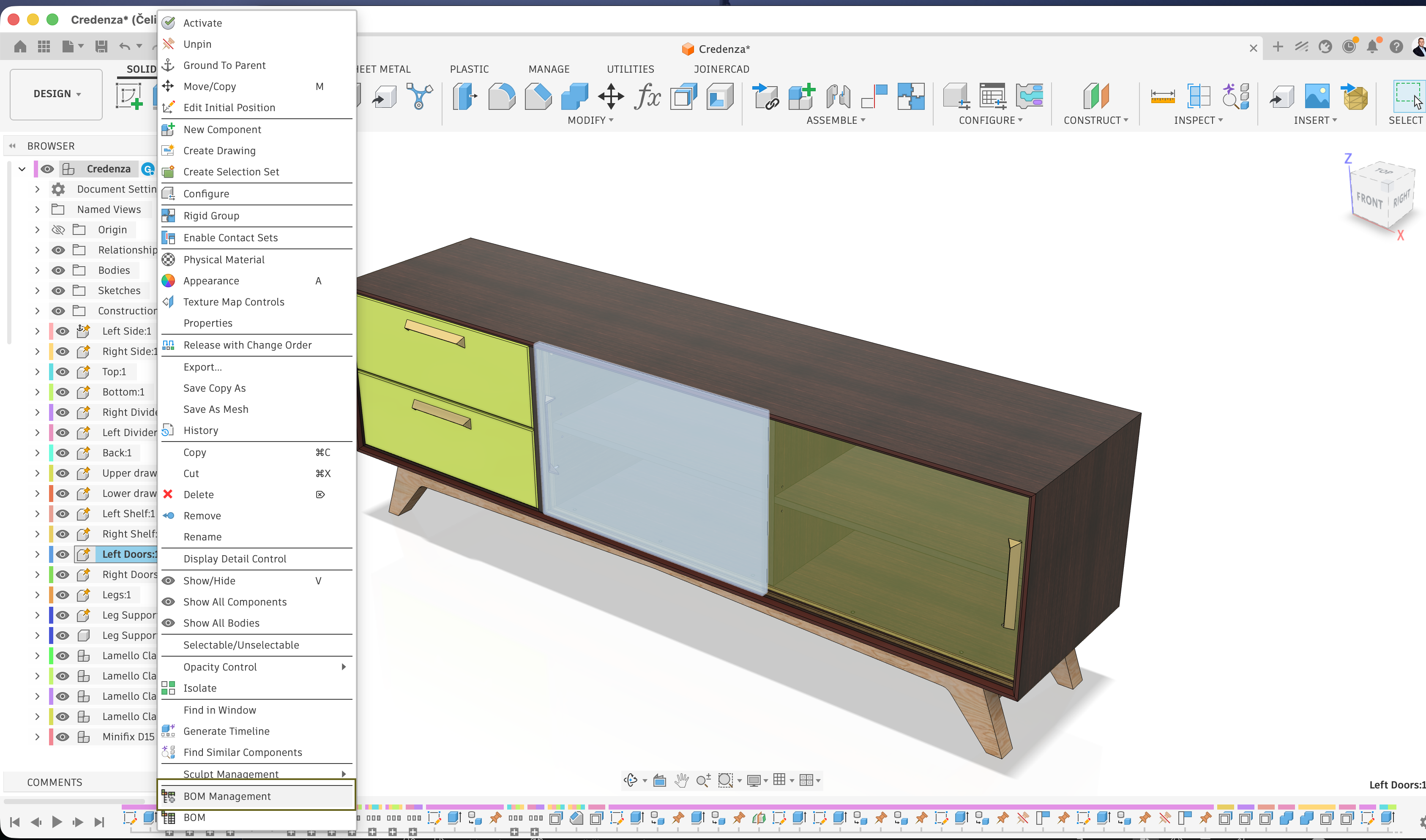 | 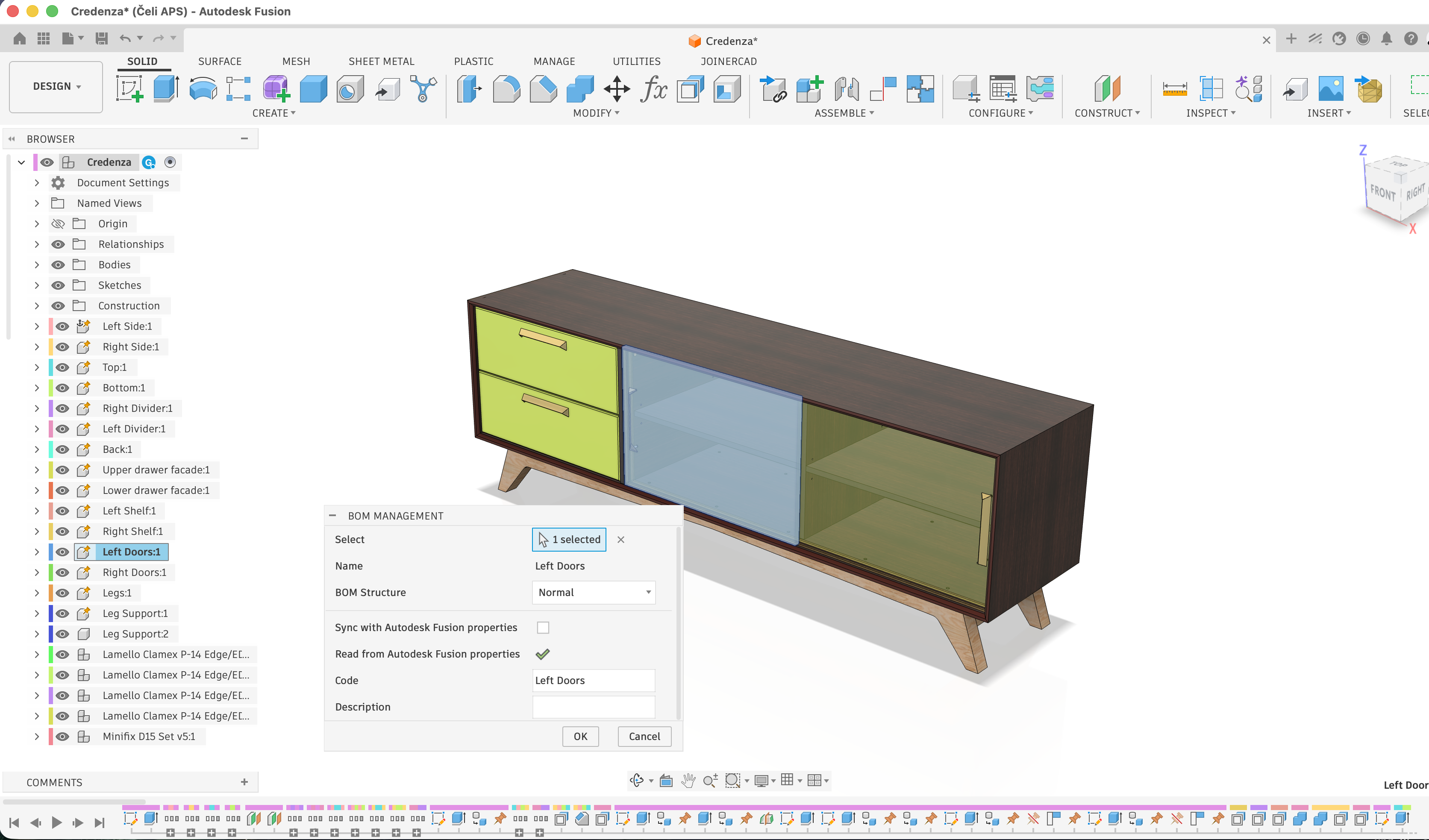 |
BOM Management dialog launch | BOM Management dialog with values |
Smart Hardware components with configurations
For users who work with Smart Hardware components that include configuration tables controlling the Part Number and Description properties, it is necessary to enable the Sync with Autodesk Fusion properties option in the BOM Management dialog. When this option is enabled, all property values will be read from the configuration table. This may slightly increase insertion time, but it allows the Part Number and Description values to be managed directly from the configuration table.
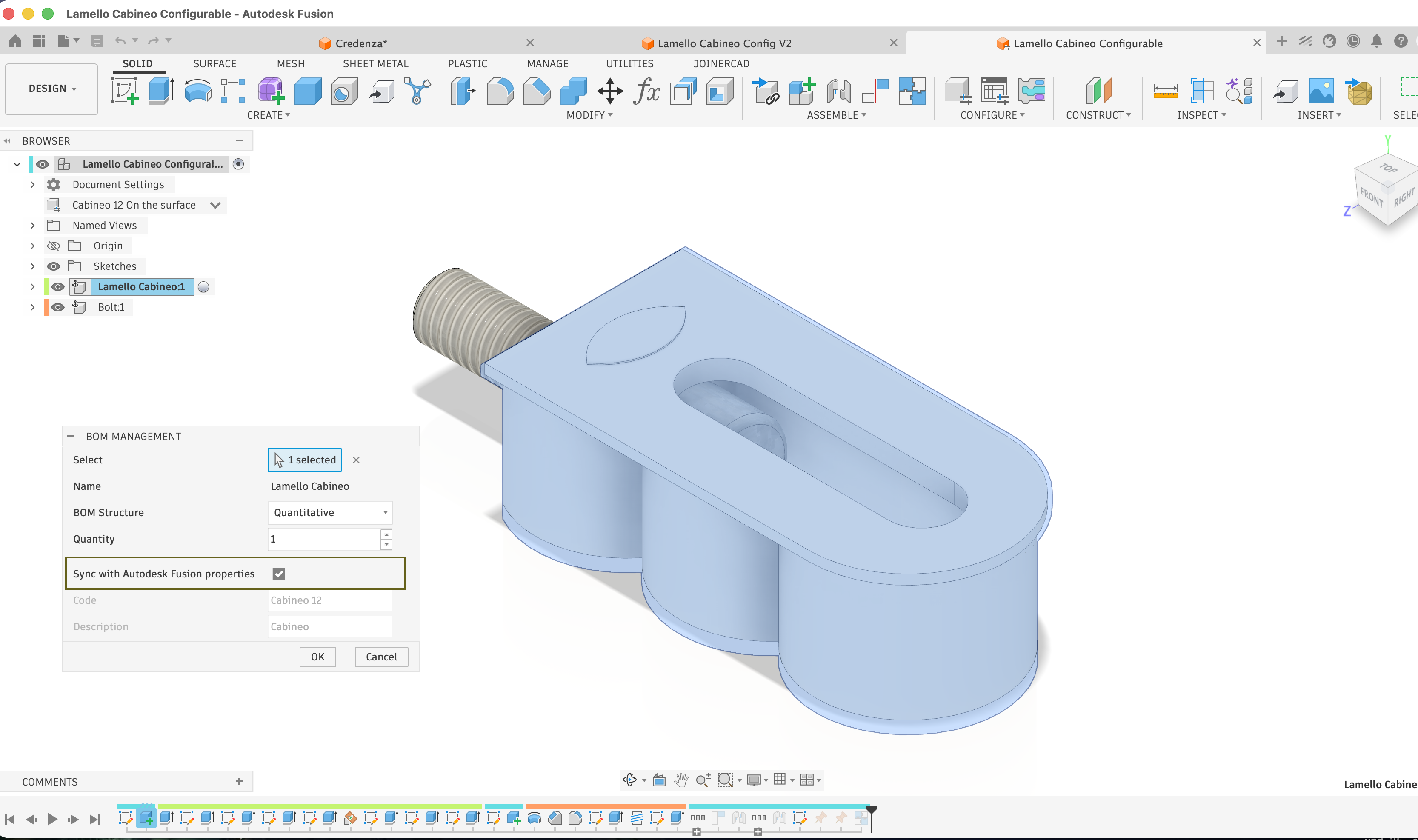 |
Sync with Autodesk Fusion properties option |
Limitations
Due to current API limitations within Autodesk's Collaborative Editing Hub, JoinerCAD cannot reliably use Fusion's standard metadata fields for Description and Part Number in migrated environments.
Managing these values independently provides the most reliable and performant solution while maintaining compatibility with Autodesk's latest platform.
Summary
JoinerCAD v3.3.0 introduces a new metadata management approach designed for Autodesk's Collaborative Editing Hub.
For users, the transition is seamless:
- No workflow changes for existing projects
- No configuration required
- Fast metadata processing is maintained
- BOMapp continues to generate specifications using JoinerCAD-managed metadata
- Autodesk Fusion Properties remain available through BOM Management when needed
- Improved compatibility with Autodesk's latest Fusion infrastructure
For additional information about Autodesk's migration to the Collaborative Editing Hub, please refer to Autodesk's official documentation:
Collaborative editing hub update for Autodesk Fusion
If you have any questions regarding this update or your Fusion migration status, please contact the JoinerCAD support team.